Household money, managed

Where the money actually went.

Hauskin runs the whole family's money in one place: everyday spending, rent and bills on schedule, staff wages, loans and money owed. It shows where the money went, what's coming up and where you could save, in your own currency, wherever you live.

Coming soon toGoogle Play Soon Coming soon to theApp Store Soon

Already running on the web for early households, by invitation. Open the app ›

No ads, no bank passwords 20 countries, 36 currencies One household, every phone 11 languages, more Indian ones soon
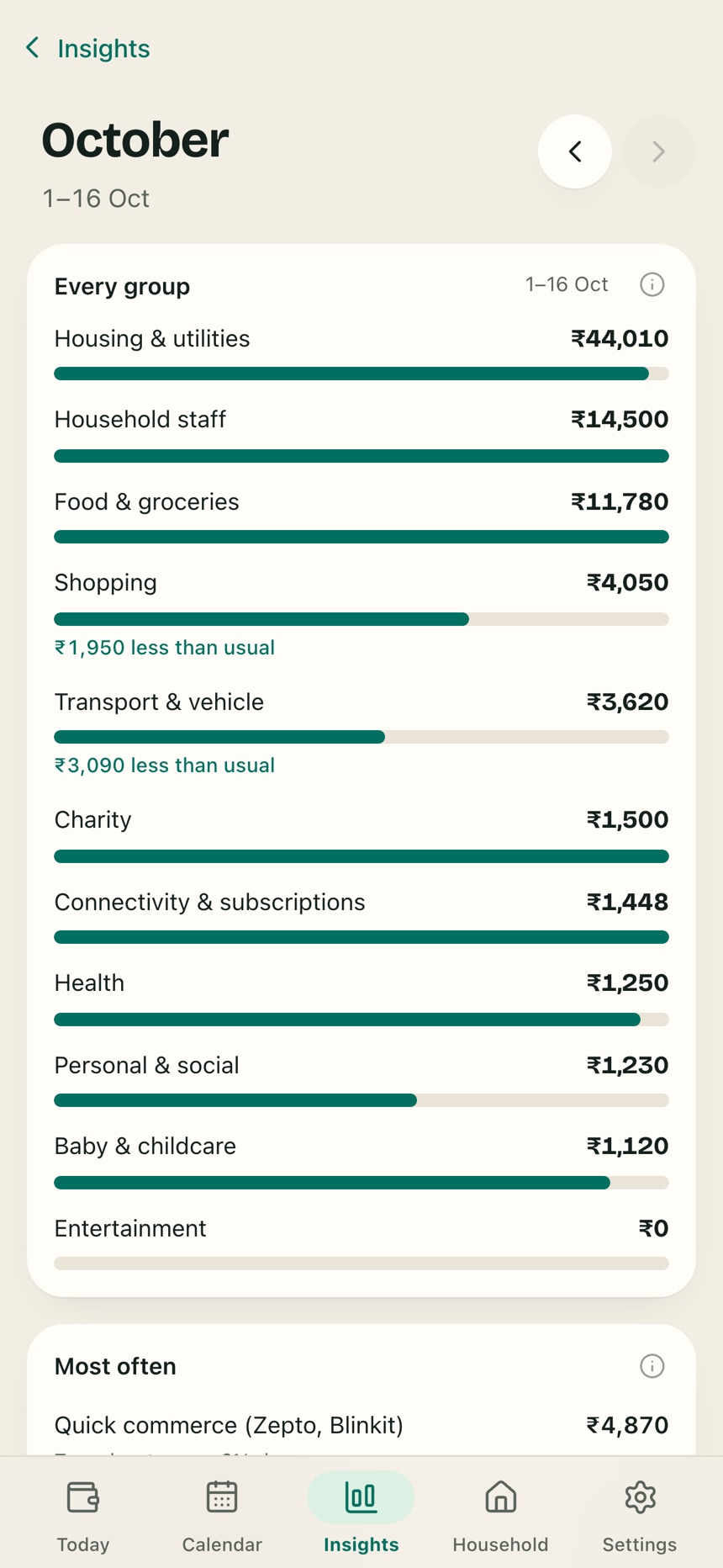
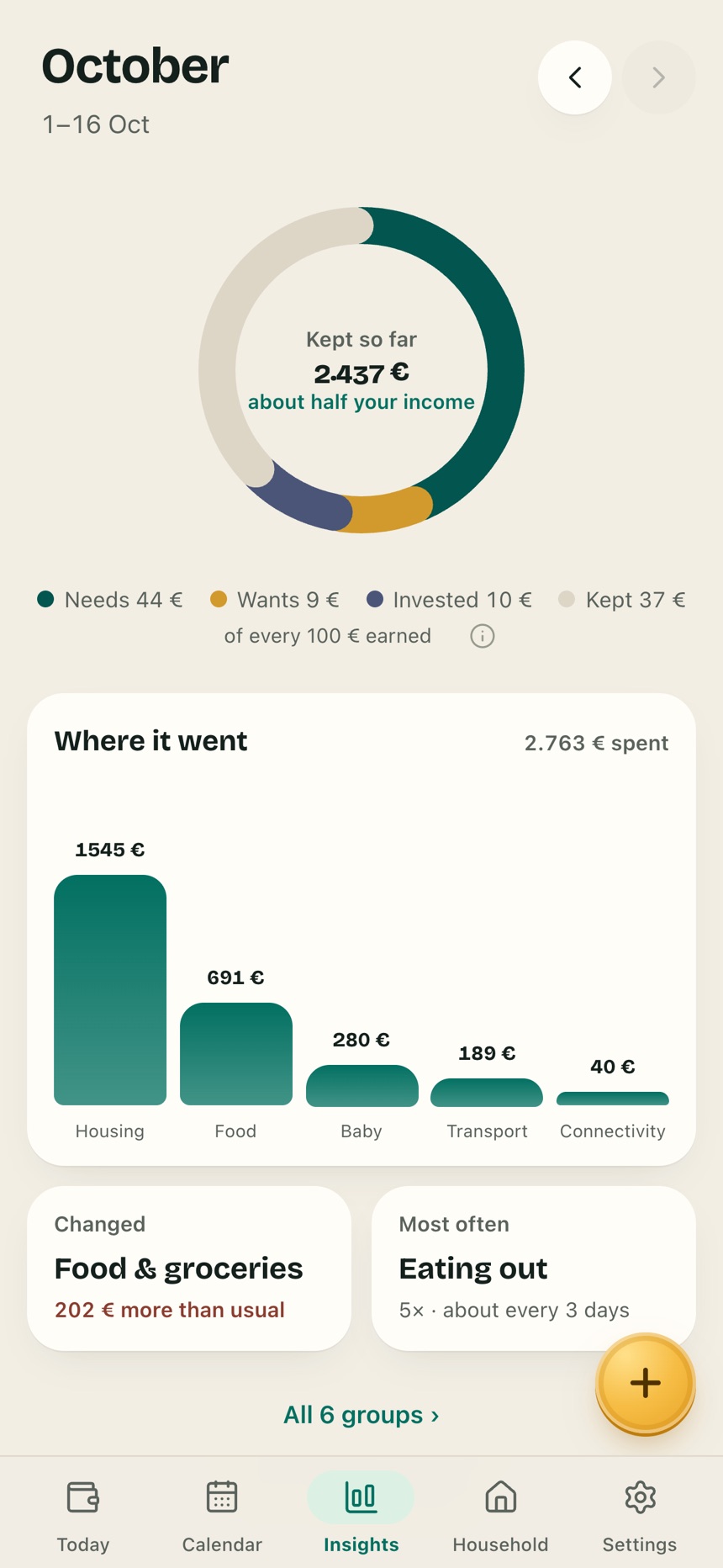
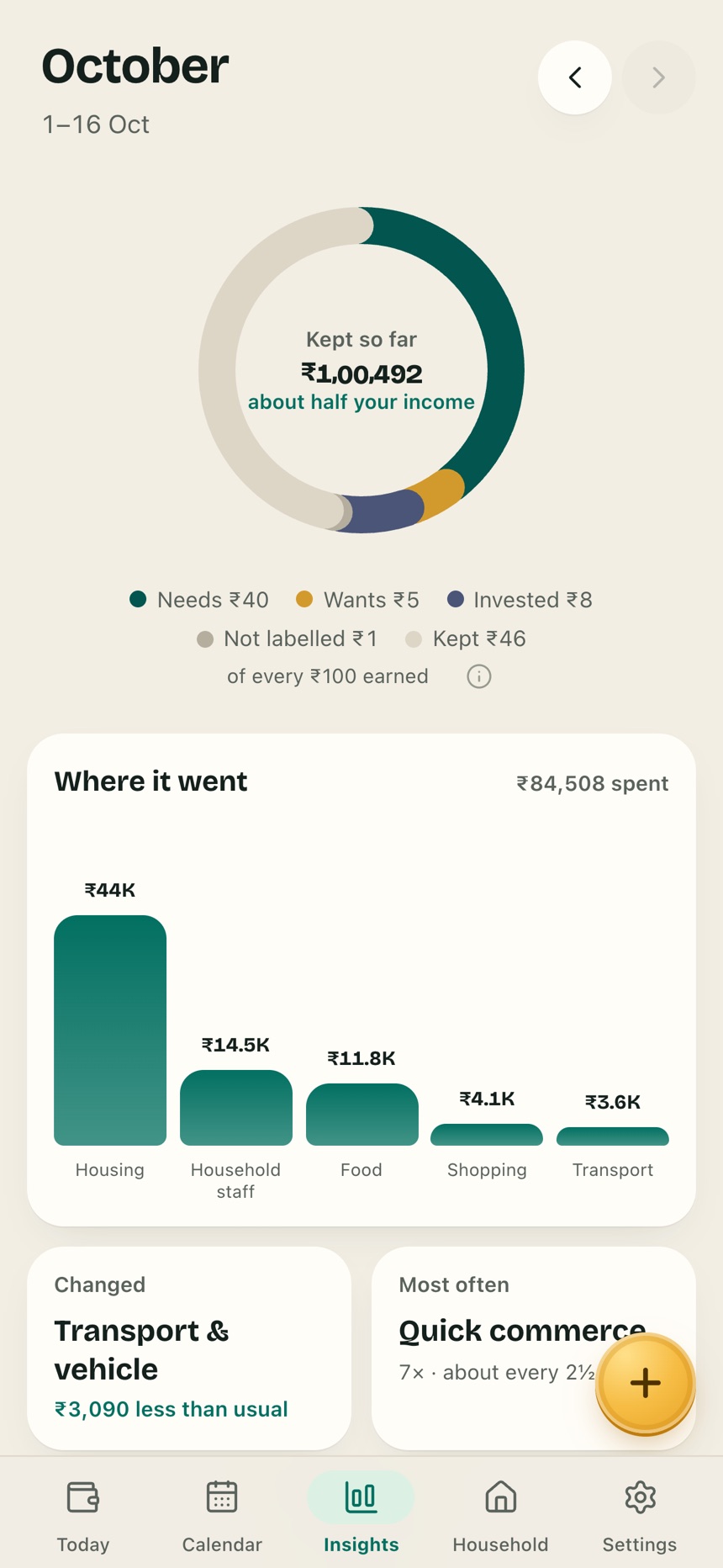
Insights: a ring of where each ₹100 of income went, and the biggest groups as columns
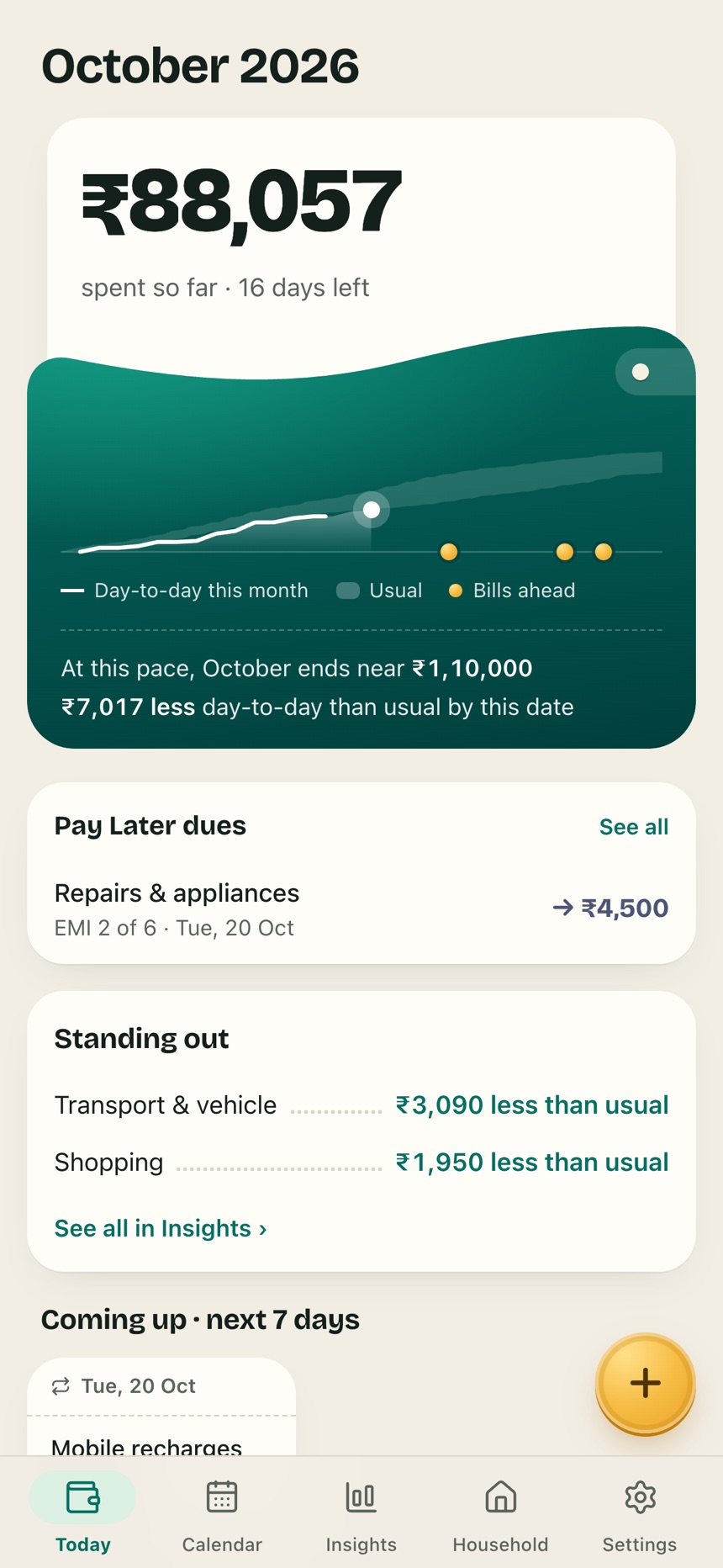
Today: the month's spending so far on a slip of paper, tucked into a green pocket that shows the month against its usual
Moved, not spent
SIP → ₹15,000 is savings, not spending
At this pace, October ends near ₹1,10,000

Three bills still to come, already counted

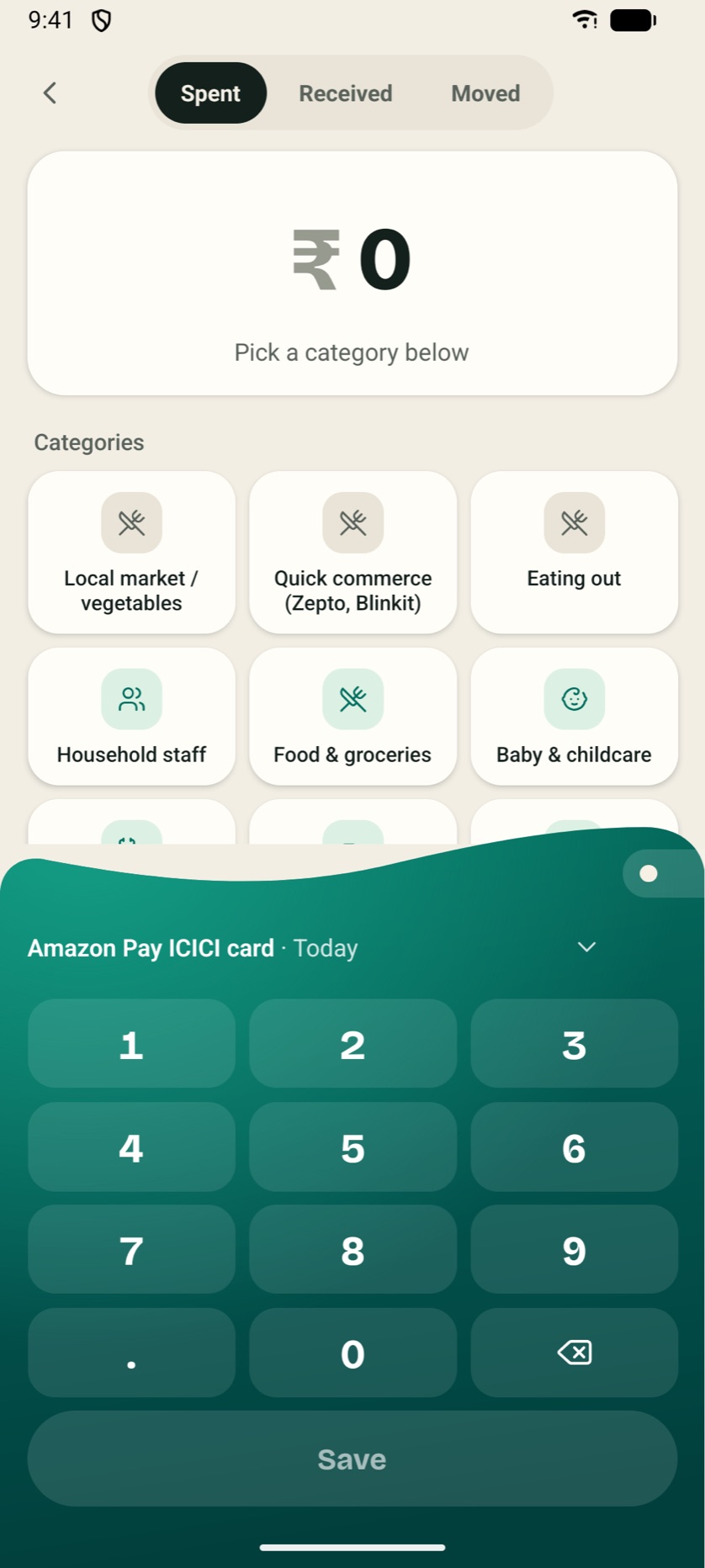
3 secto log a spend, one thumb, no forms
0ads, trackers or bank logins
36currencies, each written the local way
1place for the whole family's money

Why Hauskin

Built for how a household really spends.

Most money apps were made for one person with one card. A home has rent, staff, savings, refunds and two people paying. Hauskin gets those right first, so every number after them is true.

Spent this month₹68,310
Moved, not spent→ ₹25,000
SIP ₹15,000 · ATM to cash wallet ₹10,000

Savings are not spending.

A SIP, a pension top-up or cash from the ATM moves money; it doesn't spend it. Hauskin keeps transfers apart, so a month you saved hard never looks like a month you overspent.

↻ Rent ₹38,000↻ Milk ₹2,100↻ Broadband ₹799↻ Salary +₹1,85,000
Recorded on schedule. Nobody types them.

Rent records itself.

Set up rent, bills, subscriptions and salary once. They land on their day, and "Coming up" shows what's due this week before it leaves.

Food & groceries −₹2,780₹1,710
Mark = your usual over the same days

Compared with your usual, honestly.

"More than usual" means more than the median of your last three whole months, over the same days. Yearly bills are left out, and nothing is compared until a full month exists.

Sunita · cook₹9,000
Advance on the 12th−₹1,800
To pay on the 1st₹7,200

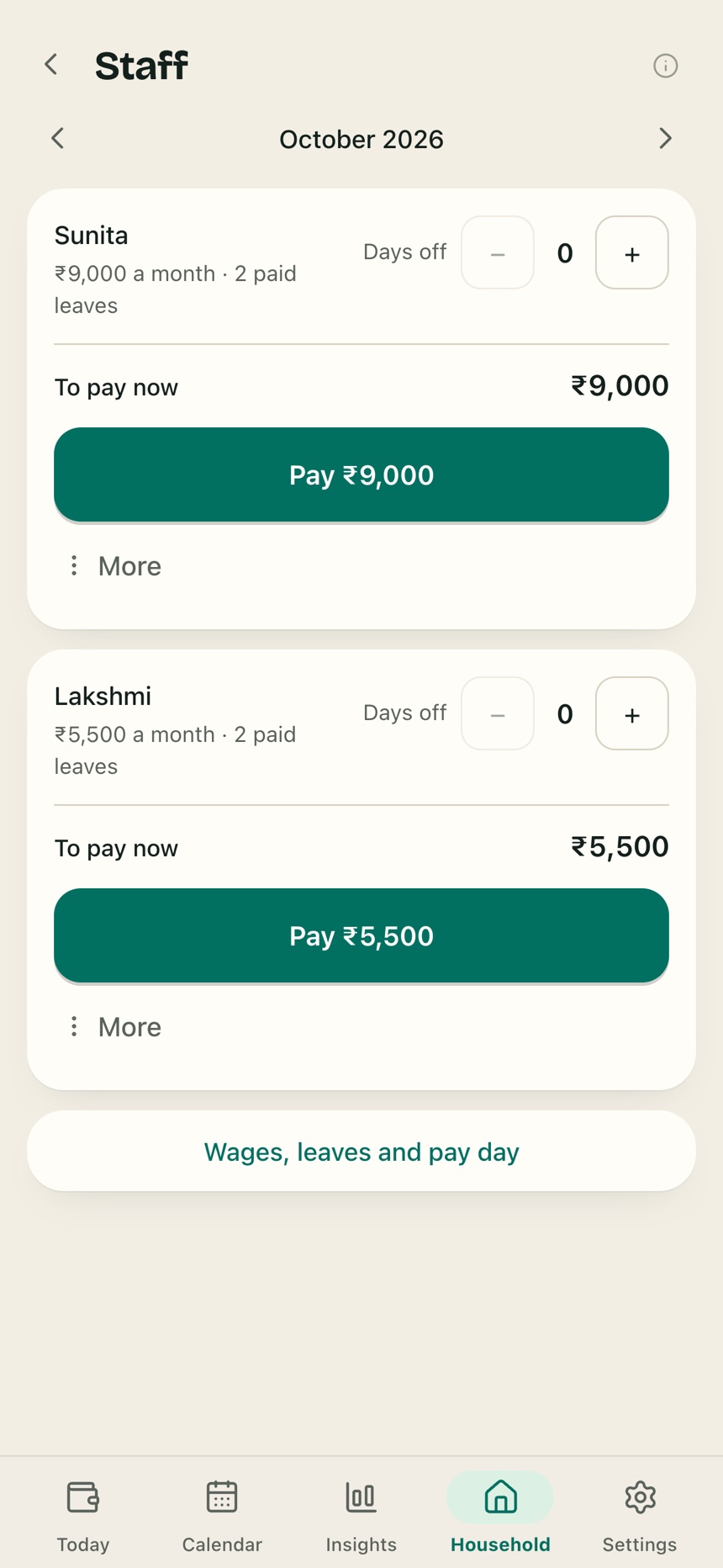
Staff, wages and advances.

Cooks, maids, nannies, drivers: wages, days off, advances and festival extras, worked out on pay day so nothing is paid twice or forgotten.

Amazon Pay card is 80% used: ₹1,60,426 of ₹2,00,000. ₹39,574 left.

Your card, before it maxes out.

Add a credit limit and Hauskin warns on Today at 80% and again at the limit, with the numbers that triggered it.

1234567
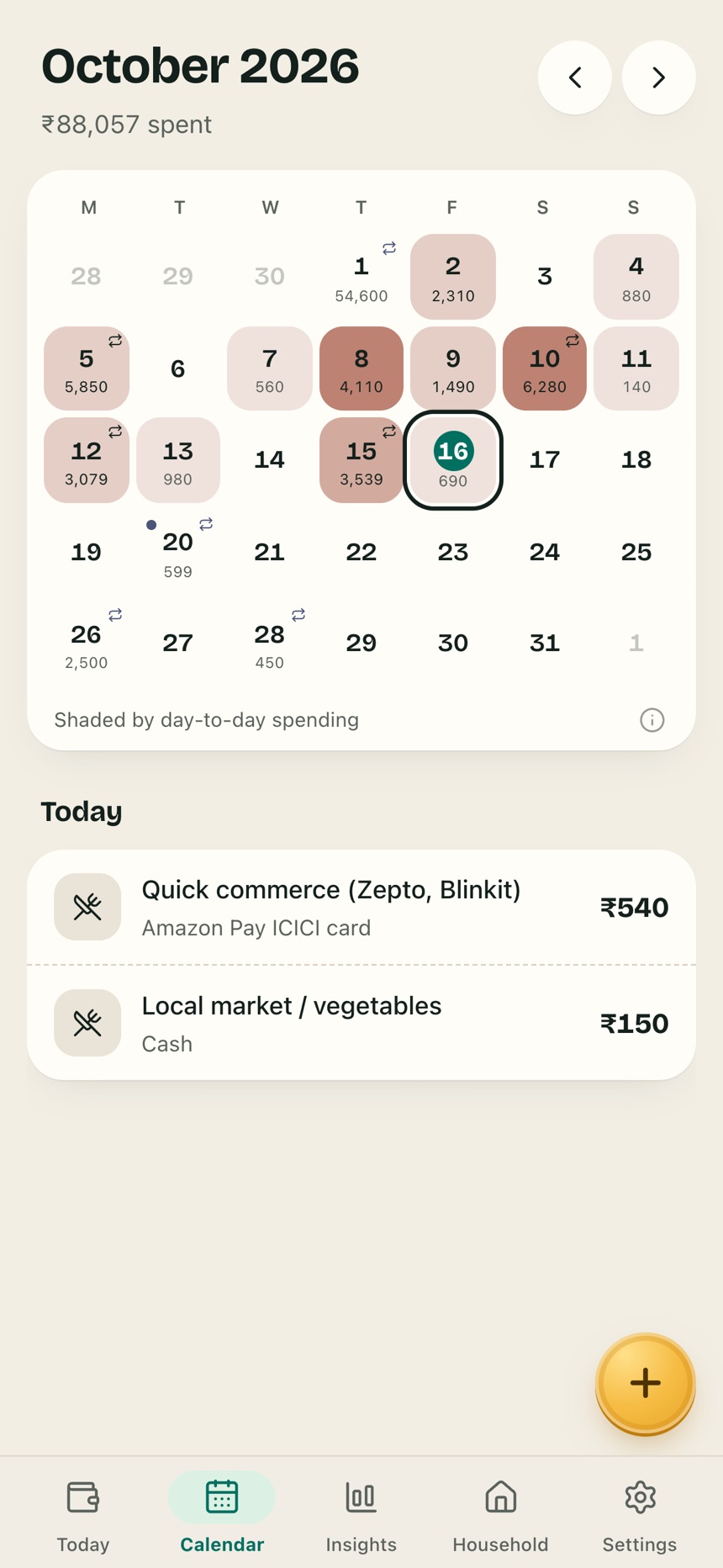
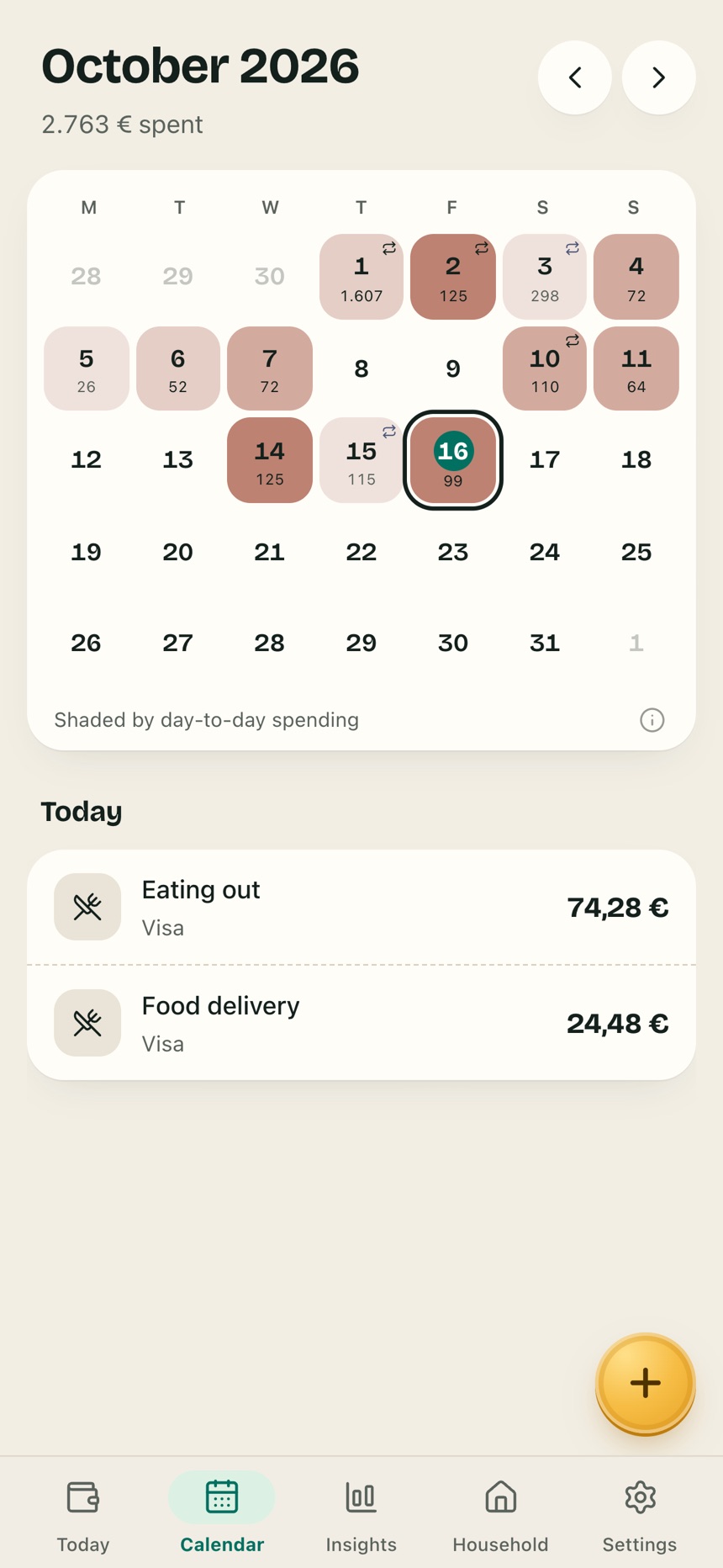
↻ marks rent and wages, and they don't darken the day

A calendar that knows rent from a splurge.

Days are shaded by what you chose to spend. The 1st, when rent and wages go out, reads as "the bills went out", not "we overspent".

Today

One glance, the whole month.

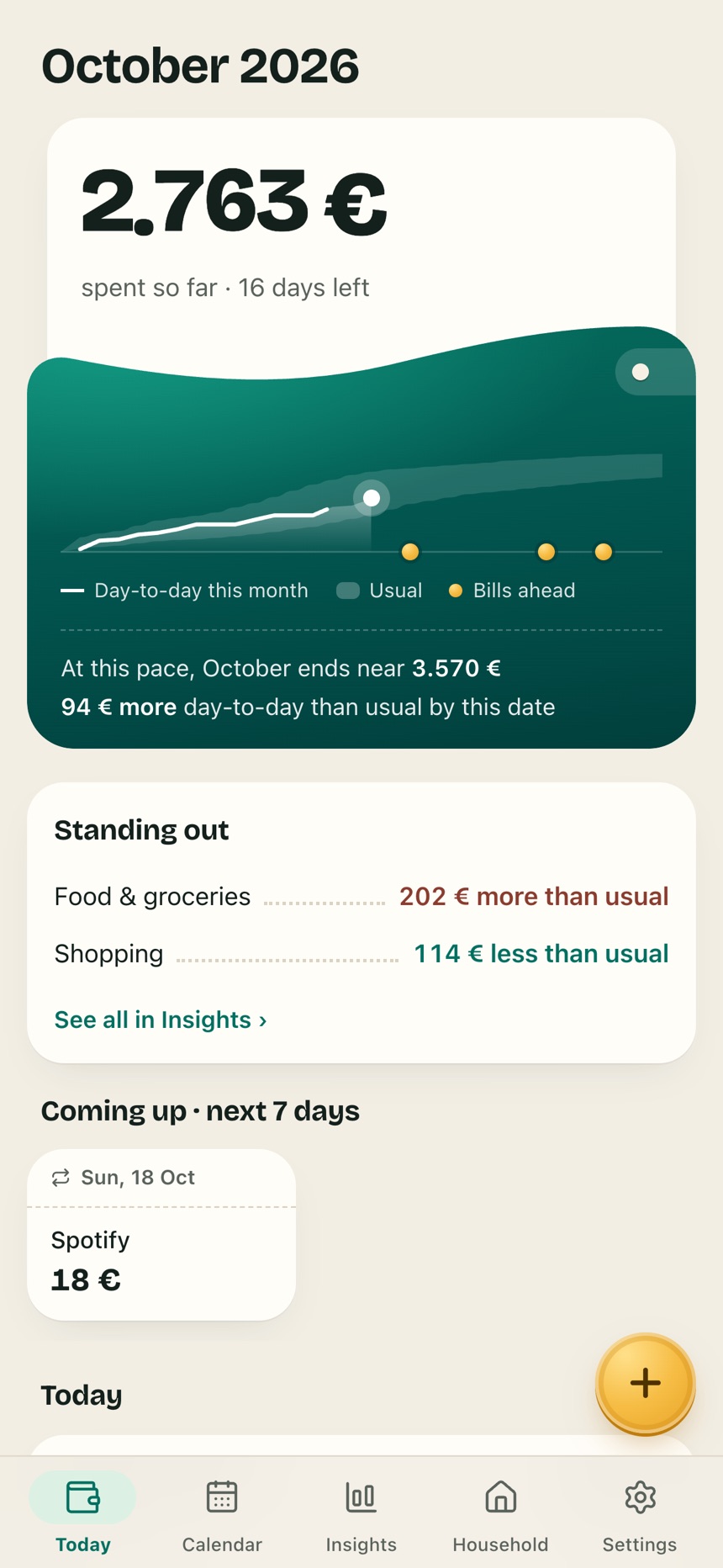
Open the app and the month is already explained: how much has gone, the line it's on against your usual, and what stands out.

  • This month against your usual, drawn as a line over a soft band, with the bills still to come marked on it. Hold a finger on any day to read it.
  • A pace that doesn't panic. Rent counts once, not thirty times; only everyday spending is projected.
  • What stands out: a group well above or below its usual, in plain words, and only when it's worth noticing.
Today: the month's spending against its usual band, an EMI due, and what stands out
Calendar, shaded by everyday spending

Insights

The why behind the number.

Where the income went, where the spending went, and what changed. Plain sentences, no jargon, and it never tells you off.

  • Of every ₹100 earned: how much went to needs, wants and investments, and how much you kept, with savings counted as kept.
  • Where it went: your biggest groups side by side, and every group against its usual one tap away.
  • What changed, and what you do most often: seven quick-commerce orders are a different habit from one big shop.
Insights: where each ₹100 went, the biggest groups, and what changed
Insights, all groups: each against its usual month

Home life, covered

Staff, cards and accounts in one place.

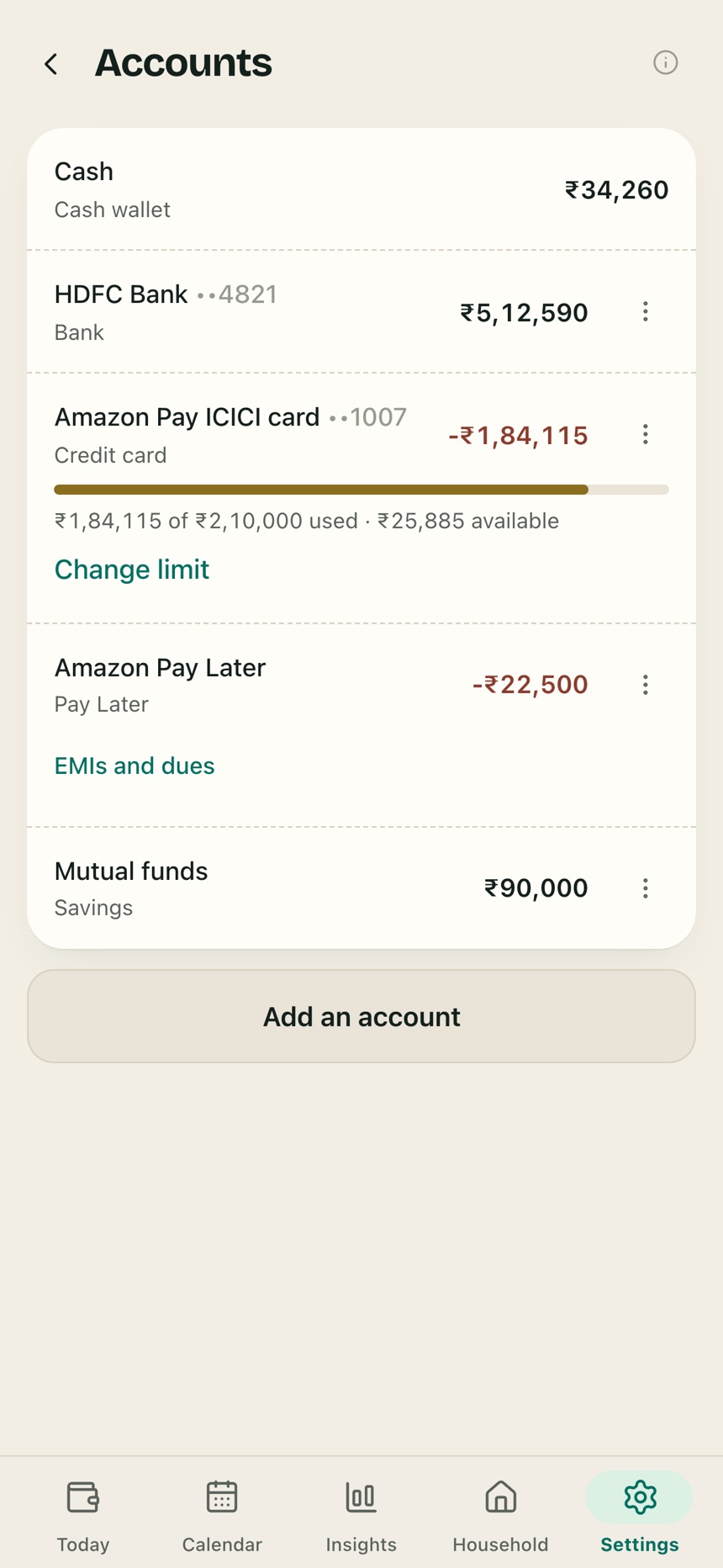
Every bank, card, wallet, Pay Later account and savings pot you pay from, and the people who help run the house.

  • Pay day in one tap, with advances and days off already taken into account.
  • Credit limits with a meter that turns amber at 80%.
  • Pay Later and EMIs: split a purchase into 2 to 24 EMIs. It counts as spent once, on the day you bought it, and each EMI shows on Today and the Calendar until it's paid.
  • Refunds net against the purchase, so an Amazon return doesn't look like income.
  • Giving has its place: zakat, tithes, a child's sponsorship. A yearly gift stays out of the monthly comparisons.
Staff screen with wages ready to pay
Accounts: a bank, a credit card meter, Amazon Pay Later and savings

Reminders Coming soon

A nudge the day before, not a fine the day after.

Every morning, one quiet note of what's due today and tomorrow, on every phone in the household. Rent, EMIs and card bills get two days' notice, so the money is in the right account in time.

  • One note a morning, never a ping for every bill.
  • Two days' notice for the big ones: rent, EMIs and card bills. Time to move money, not pay a late fee.
  • Renewals before they charge: Netflix renews tomorrow, while you can still cancel.
  • Pay day, so wages go out on time. Everyone can switch off any kind they don't want.

Reminders are set up on your own phone. Your bills are never handed to a notification service.

On your wrist

Log it before the change is in your pocket.

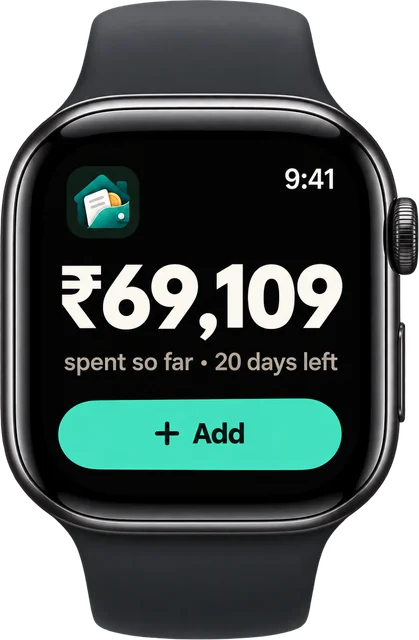
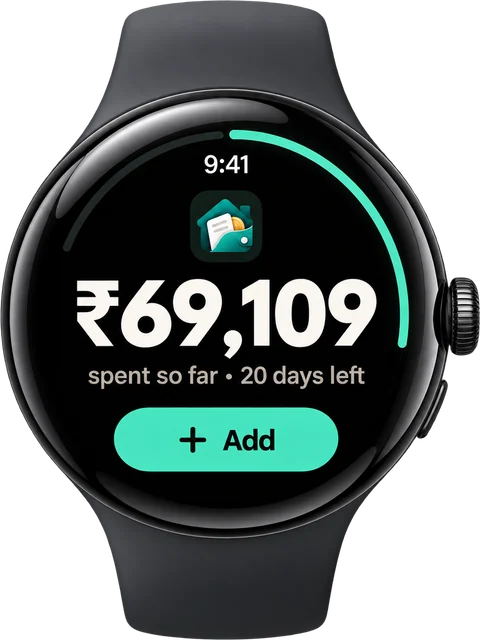
Watch apps for Apple Watch and Wear OS come next, right after the phone apps reach the stores. Small on purpose: the two things worth doing from your wrist.

  • Add a spend in two taps: the amount, then one of your most-used categories.
  • The month at a glance on your watch face: spent so far, and the days left.
  • The same household: what you add on the watch is on everyone's phone at once.
Apple Watch mock-up: ₹69,109 spent so far, 20 days left, and an Add button
Apple WatchComing soon
Wear OS watch mock-up: ₹69,109 spent so far, 20 days left, a ring showing how much of the month has gone, and an Add button
Wear OSComing soon

Worldwide

Your currency. Your way of writing it.

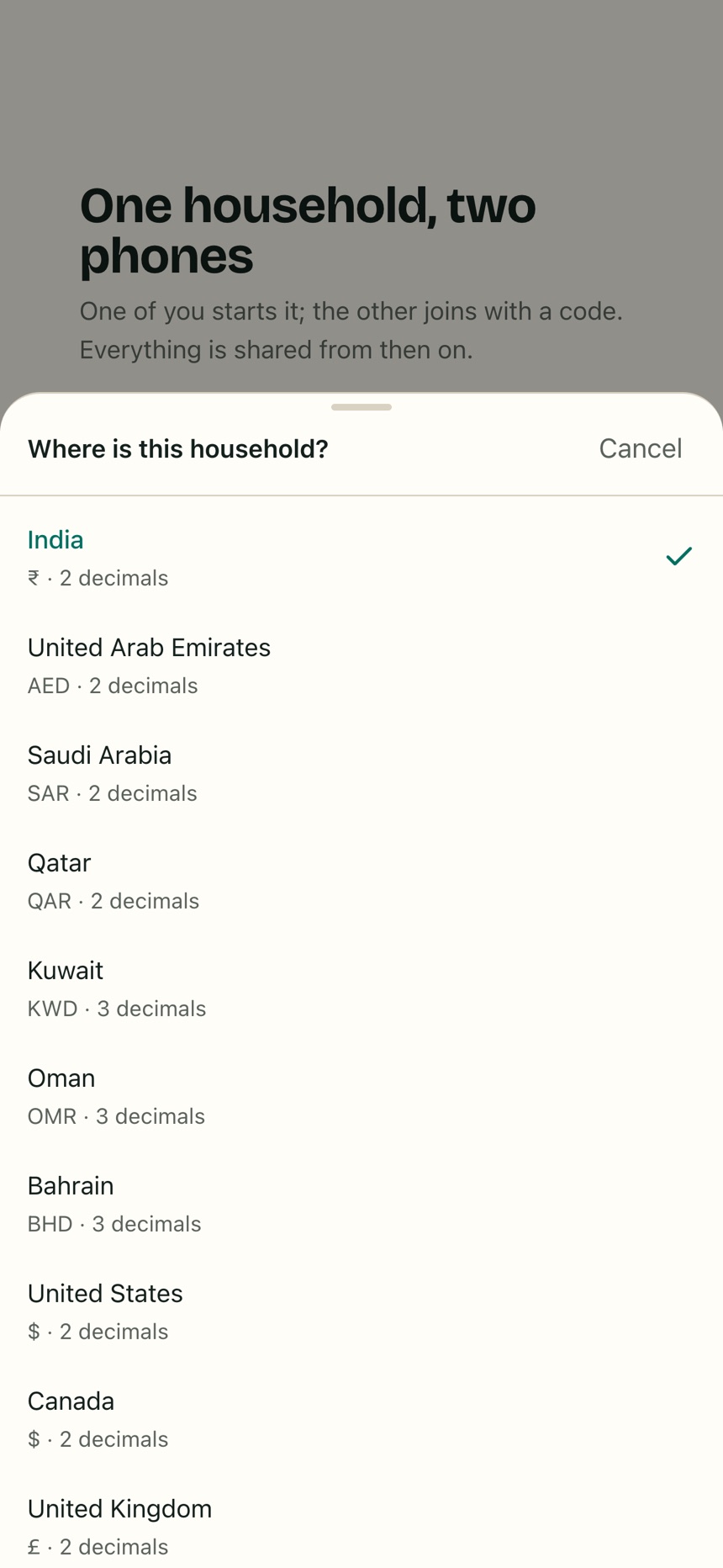
Pick where your household lives and Hauskin sets the currency and the local way of writing money: lakhs in India, a comma for cents in Germany, three decimals for the Kuwaiti dinar, none for the yen. Amounts are never converted or rounded behind your back.

Living somewhere else? Pick your currency from the list, from the South African rand to the Turkish lira.

October 2026 · spent so far
₹68,310
Rent₹38,000
Groceries this week₹2,450.50
Moved to savings→ ₹15,000

Indian rupee · 2 decimals · grouped in lakhs and crores.

Languages

Your money, in your own language.

Not everyone thinks about money in English. Hauskin speaks eleven languages today, with eight more Indian languages close behind. Each person picks their own: one of you can read Hindi while the other reads English, in the same household. Money and dates are still written your country's way.

Soon
বাংলাதமிழ்తెలుగుमराठीગુજરાતીಕನ್ನಡമലയാളംਪੰਜਾਬੀ
October 2026
₹69,109
spent so far · 20 days left
At this pace, October ends near ₹86,500
Received₹1,85,000
Moved, not spent→ ₹25,000
Where it went
Transport & vehicle₹3,060
Housing & utilities₹2,510
Food & groceries₹1,710

The real Today screen, word for word. Pick yours in Setup.

The difference

The same month, told truthfully.

Small rules, big consequences. Get these wrong and every chart after them is wrong too.

When this happensIn many expense appsIn Hauskin
You invest ₹15,000 in a SIPLogged as an expense, so saving looks like overspendingMoved, not spent. It counts as kept.
An order is refundedOften entered as income, inflating what you earnedNets against the original purchase, in its own category
You buy on Pay Later in six EMIsEach EMI logged as a new spend, so one purchase is counted again every monthSpent once, on the day you bought it. Each EMI is money moving, with its due date shown
Rent, bills and salaryTyped in again every month, or forgottenRecorded on schedule, on their own
"Are we spending more?"This month so far against all of last monthThe same days, against the median of three whole months
The cook, the maid, the driverNot coveredWages, advances, days off and extras
Your dataAds, bank logins or data-driven offers are commonNo ads, no bank passwords, never sold or shared

"Many expense apps" describes common practice in the category, not any one product.

Pricing

Free to start. More as you need it.

Running a household's money is free, for good. Plus adds the insight and the tools for a bigger home, for less than a cup of chai a week. One plan covers everyone in the household.

Basic
Free

Forever. No trial clock, no card.

Everything to run it

  • Unlimited entries, accounts and categories
  • Rent, bills and salary on schedule
  • Today: the month so far, its pace and what's coming up
  • The calendar and every past month
  • Credit card limit warnings
  • Two people in one household
  • Download all your data, delete it any time
Plus Most homes
₹799a year, per household · about ₹67 a month

Outside India: $23.99, €23.99 or £19.99 a year. Google Play shows your own price.

Everything in Basic, and

  • Comparisons with your usual month
  • Insights: where the income went, group by group
  • Staff and payroll: wages, advances, days off, extras
  • Loans, money lent and money owed
  • Everyone in the household, each entry marked with who paid
  • Restorable backups of the whole household
  • Monthly and yearly PDF reports to share with your accountant
Premium With AI
Lateronce it's built

On sale when these are ready. Households on Plus hear first.

Everything in Plus, and

  • Upload months of bank statements and see where you overspend and how to save Coming
  • Goal planner for the big things: a car, a home, a trip Coming
  • Ask the AI about budgets, saving and how investing works Coming
Pro
Lateronce it's built

On sale when these are ready.

Everything in Premium, and

  • Unlimited AI conversations Coming
  • A year-end tax pack for your country, ready for your CA or accountant Coming

Testing Hauskin today? Households in the early-access group keep every plan free after launch, Premium and Pro included when they arrive. It's tied to your household, so it carries over to the store apps.

Each plan covers the whole household, on every phone and on the web. Billed through Google Play, cancel any time there; the App Store follows later. Indian prices include GST. The AI explains and plans; it doesn't recommend specific investments. For that, talk to a registered financial adviser.

Questions

Good to know.

When can I download it?

The Android app comes first, on Google Play, and the iPhone app follows. Until they arrive, Hauskin runs in the browser at myhauskin.com/app for invited households, and installs to your home screen like an app. Write to hello@myhauskin.com and we'll tell you the day it lands in the stores.

Will it remind us before bills are due?

Yes, in the phone apps. Each morning everyone in the household gets one note of what is due today and tomorrow, and rent, EMIs and card bills get two days' notice. The reminders are set up on your own phone, so your bills are never sent to a notification service, and each person can turn off any kind they do not want.

Will there be a watch app?

Yes, for Apple Watch and for Android watches on Wear OS, right after the phone apps launch. It will log a spend in two taps and show the month at a glance, and everything you add appears on the household's phones straight away.

Which languages does it speak?

Eleven today: English, Hindi, Arabic, German, French, Dutch, Spanish, Malay, Japanese, Korean and Simplified Chinese. Bengali, Tamil, Telugu, Marathi, Gujarati, Kannada, Malayalam and Punjabi are coming soon. The language is chosen per person, so one of you can use Hindi and the other English in the same household. Money and dates are always written your country's way, whatever the language.

Does it connect to my bank?

No, and it never asks for a bank password. Logging takes about three seconds, and rent, bills and salary record themselves on schedule, so most of a month fills in without typing. On Premium you'll also be able to upload bank statements as files and see exactly where the money is going.

Which countries does it work in?

Twenty countries are set up with their currency and local number style, including India, the Gulf states, the US, Canada, the UK, Germany, France, Australia, Singapore and Japan. Anywhere else, pick your currency from a longer list: 36 in all. Each household keeps one currency; nothing is converted.

Can my partner use it too?

Yes. One of you starts the household and the other joins with a code. You share one household, and each entry can say who paid.

Who can see my money?

Only the people in your household. Hauskin shows no ads and never sells or shares your data. Your data is kept in a secured database, and you can delete the whole household, with everything in it, at any time.

Does the AI tell me what to invest in?

No. It helps you plan: what a car or a trip means for your monthly budget, where you could save, and how things like SIPs, emergency funds and fixed deposits work. It doesn't recommend specific funds or shares; for that, talk to a registered financial adviser.

What happens to my entries if I stop paying?

Nothing is lost. Every entry stays, and so does everything in Basic. The paid features simply pause until you come back.

Know where it went.
Every month.

Coming soon to Google Play and the App Store. Be the first to know when it lands.

Coming soon toGoogle Play Coming soon to theApp Store
Tell me when it launches